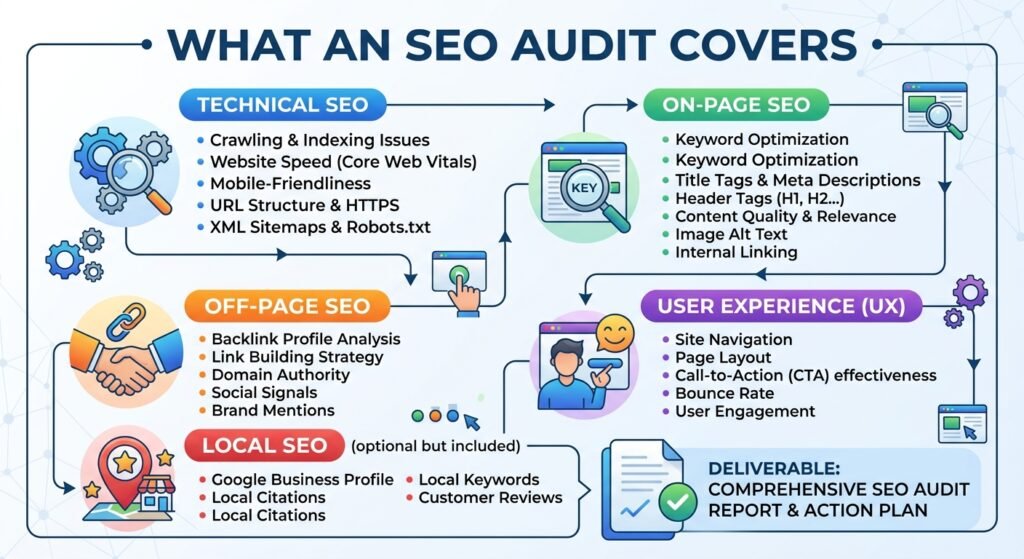
An SEO audit checks whether search engines can crawl, index and understand a website, how well its pages match what people search, and what’s holding its visibility back. A useful audit covers technical health, on-page content, site structure, search performance data and, now, readiness for AI search. More importantly, it ranks every finding by impact and says exactly how to fix it.
I’ve read audits that ran to 200 pages without saying what to do first. This post covers what an audit should include, and uses a real audit I carried out on Shake Shack UK’s website to show what useful looks like.
What a proper SEO audit includes
A proper SEO audit includes a full crawl of the site, a review of Google Search Console data, checks on indexing, redirects, speed, mobile experience and structured data, an on-page review of titles, headings and content, a look at site structure and internal links, and a prioritised list of fixes.
| Area | What’s checked | Why it matters |
|---|---|---|
| Crawling and indexing | Which pages Google can reach and has indexed, noindex tags, robots.txt, canonicals, sitemaps | A page Google doesn’t index can’t rank |
| Redirects and errors | Broken pages, redirect chains, legacy URLs | Lost visitors and wasted value from links |
| Search performance | Clicks, impressions, positions and declining pages in Search Console | Shows where visibility is being won and lost |
| Page experience | Core Web Vitals, mobile layout, image sizes | Slow, unstable pages frustrate people on phones |
| Structured data | Valid markup for the business, products, articles and breadcrumbs | Helps Google understand pages and supports rich results |
| On-page content | Titles, descriptions, headings, content depth, duplicate content | Decides whether pages match what people search |
| Site structure | Navigation, internal links, orphan pages | Helps visitors and search engines find important pages |
| International and local | Hreflang, location pages, business details | Makes sure the right page shows to the right audience |
| AI search readiness | AI crawler access, direct answers, authorship, entity clarity | Affects whether AI tools can use and cite the site |
Why prioritisation matters more than the checklist
The value of an audit is in the order of the fixes, not the length of the list. Most sites have dozens of minor issues and a handful that genuinely hold back visibility. A useful audit separates the two, explains the impact of each, and says what can safely wait.
Many audits are generated straight from a crawling tool, with hundreds of warnings of equal weight. That leaves a business owner or developer guessing where to start, and often fixing easy but unimportant things first.
A prioritised audit should give each finding:
- a priority, based on how much it affects visibility or revenue
- the evidence, such as the affected URLs and data
- the fix, described clearly enough for a developer to act on
- who does it, whether that’s a developer, content writer or the business owner
- how to confirm it’s fixed
A real example: Shake Shack UK
In January 2026 I carried out a technical SEO audit of Shake Shack UK’s website. It crawled 972 of the 1,219 URLs found, and grouped findings into 11 high, 5 medium and 5 low priority issues, plus warnings and opportunities. Every issue went into a shared tracker with a fix and a status.
The high-priority findings included:
- an offers page marked noindex, stopping Google showing a page that should be found
- structured data errors on menu pages, and a parse error on a location page
- hreflang annotations not using canonical URLs, with some pointing to non-indexable pages
- legacy URLs returning 404 errors, left over from old location pages
- failing mobile Core Web Vitals on the homepage, with Cumulative Layout Shift of 0.29 against Google’s threshold of 0.1 for a good score
- location pages losing traffic, with missed opportunities around “near me” searches
Medium and low-priority findings covered H1s changed by JavaScript, multiple H1s, large images, long titles, missing alt text and missing meta descriptions. They mattered, but they weren’t what to fix first.
What happens after the audit
An audit only helps once its fixes are live, so the useful part often comes after the report: briefing developers, answering questions, and checking the live site to confirm each fix actually worked. Fixes marked as done aren’t always complete.
On Shake Shack UK, fixes completed included removing the noindex from the offers page, correcting menu page structured data, aligning hreflang with canonical URLs, handling legacy 404s, redirecting an outdated page and rewriting meta descriptions with a template for locations and menu items.
When the image fix for layout shift was checked on the live homepage in May 2026, 166 of the 294 images on the page still lacked width and height attributes. Most were icons repeated once per location inside a template, so one template change would clear the majority. That went back to the development team with a list of every affected image. The Shake Shack UK case study covers the full project.
What you should receive
You should receive a clear summary of the most important findings, a prioritised fix list with evidence and instructions, and a plan for checking the fixes. The format matters less than whether your team can act on it without needing the audit explained line by line.
- A short summary of the three to five issues that matter most, in plain English
- A prioritised fix list, usually a spreadsheet, with priority, affected URLs, fix, owner and status
- Developer briefs for technical changes
- Content recommendations for pages that need rewriting or merging
- A verification plan for confirming each fix on the live site
Be wary of an audit that gives an overall score out of 100 without explaining what’s behind it. Google’s own guidance on hiring an SEO is worth reading before you commission one. It says an audit should give realistic estimates of improvement and of the work involved, that you should only grant read access to Search Console at the audit stage, and that if someone guarantees first place in search results, you should find someone else.
Can ChatGPT or a free tool do an SEO audit?
AI tools and free checkers can spot common issues on individual pages, and they’re a reasonable first look. They can’t crawl a whole site thoroughly, see your Search Console data, check what’s actually live, or judge which issues matter most for your business. That judgement is most of an audit’s value.
Free tools are good at checking one page for missing titles, broken structured data or a noindex tag. The free SEO checker does exactly that. Where they fall short is anything that needs the whole picture: which of 50 issues is costing the most traffic, why a set of pages dropped, or whether a fix marked as done is actually live.
What I learned
The audits that led to the biggest improvements weren’t the longest. They were the ones where the first page said plainly what to fix first and why, where developers could act on each fix without a meeting, and where someone checked afterwards that the fixes had actually worked on the live site.
Shake Shack UK showed why the checking matters. A fix recorded as complete still had 166 images missing attributes on the live page. Without looking, it would have been marked done and the layout shift would have stayed.
If you’d like your site audited this way, a technical SEO audit covers crawling, prioritisation, developer briefs and verification.
FAQ
How long does an SEO audit take?
It depends on the size and complexity of the site. A small business site with a few dozen pages can be audited much faster than an ecommerce store with thousands of products or a multilingual site. The crawl is usually quick. Reviewing data, prioritising findings and writing clear fixes takes most of the time.
How often should a website have an SEO audit?
A full audit is worth doing before or after major changes, such as a redesign or migration, and roughly once a year for most small businesses. In between, a monthly check of Search Console catches new indexing problems and falling pages before they become bigger issues.
What’s the difference between a technical SEO audit and a content audit?
A technical SEO audit checks whether search engines can crawl, index and understand the site, covering things like redirects, speed and structured data. A content audit reviews what the pages say: whether they match searches, overlap with each other, need updating or should be merged. Many businesses benefit from both.
Can I do an SEO audit myself?
You can do a basic one. Google Search Console shows indexing problems and pages losing clicks, and free tools check individual pages. What’s harder without experience is crawling the whole site, working out which issues matter most and writing fixes a developer can act on without further questions.
More on SEO:
- Google Search Console for small businesses
- Which schema types still matter in 2026
- The what is SEO guide
If you’d like to know what an audit would find on your site, get in touch or ask for a free assessment.
Sources
- Do you need an SEO?, Google Search Central, accessed 15 September 2026. Supports: realistic estimates in an audit, read-only Search Console access, avoiding guarantees of first place.
- Understanding Core Web Vitals and Google search results, Google Search Central, accessed 15 September 2026. Supports: Core Web Vitals as page experience measures.
- Shake Shack UK, technical SEO audit workbook (January 2026) and live fix verification (May 2026). Supports: URLs crawled, priority counts, findings, completed fixes and the image verification figures.