The title tag, the H1 and the meta description are three separate things, and they can disagree with each other without anything looking broken. The page reads fine, the CMS shows a title, and the problem only appears when you compare the raw HTML with what Google shows in the results. This post covers what each one does, how to check all three together, and which faults are worth fixing first.
What each of the three does
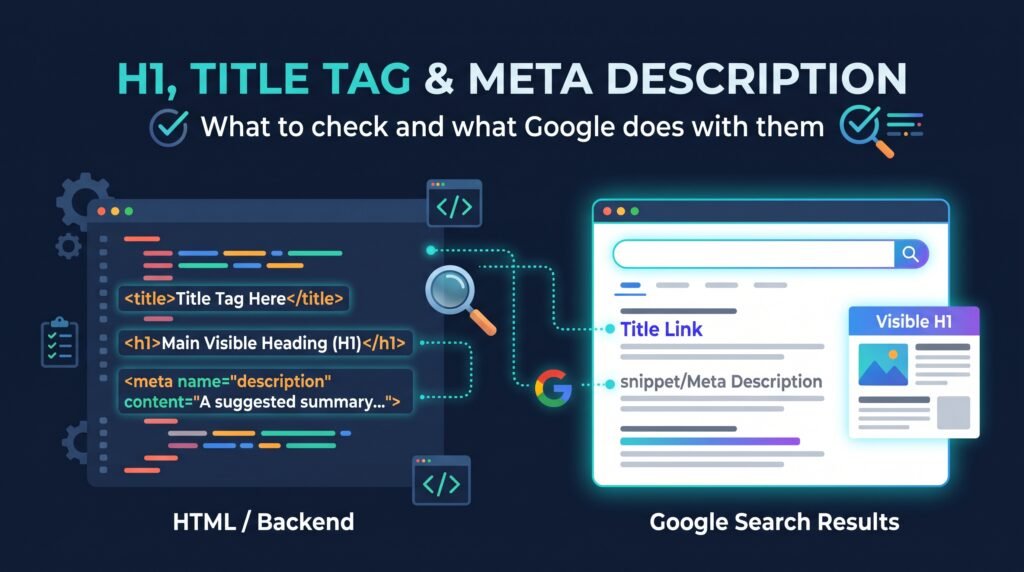
The title tag is the main source Google uses for the blue link in search results. The H1 is the visible main heading on the page. The meta description is a suggested summary for the snippet underneath. Google can draw the link text from either the title or the H1, but treats the description as optional.
Google’s documentation on title links says they’re generated from several sources, including the title element, the main visible heading and sometimes other prominent text on the page [1]. A 2021 Search Central post said the title element was used more than 80% of the time, which is a useful guide to how often your own wording survives, though it’s an old figure and I’d treat it as indicative [2].
The meta description is different. Google says snippets are mainly built from the page’s own text, and that it uses the description only when it thinks that gives a more accurate summary [3]. A description isn’t a ranking factor, and Google’s own staff have said there’s no guarantee a particular description will be used [3][4].
Check all three together
The quickest useful check is a crawl export with the title, H1 and meta description for every URL in adjacent columns. Duplicates, blanks and mismatches show up when you sort and filter. I’d also read a sample of rows by eye, because a template can produce text that passes every automated test and still reads badly.
One thing catches people out. The title tag and meta description sit in the page’s <head>, and any tool that converts a page to readable text will often drop the head entirely. If you check a page through a text view or a rendered preview, you can end up reporting that a title is missing when it isn’t. Look at the raw HTML source, or use a crawler that records the head, and compare it with the rendered version if the site builds its titles in JavaScript.
| Check | What you’re looking for |
|---|---|
| Title tag | Present once per page, unique across the site, describes this page |
| H1 | Present, one clearly main heading, consistent with the title |
| Meta description | Present where you want to control the snippet, unique, accurate |
| Raw HTML vs rendered | The same values in both, with nothing set late by JavaScript |
The faults I’d look for first
Template faults come first, because one change fixes hundreds of pages. A plugin or theme can output titles with unrendered variables, a repeated suffix, or the same text on every page of a type. On a client site I audited in August 2026, 24 of 75 guide pages served an unrendered plugin variable inside the title tag. One of them had 63,483 impressions at an average position of 4 and only 18 clicks. The ranking looked healthy, and the live title was what explained the gap.
After templates, I’d check for missing H1s, pages where several headings of similar prominence compete, and titles that carry an outdated year. Google’s documentation says that when several large headings look equally prominent it may use the first, and gives an out-of-date year in a title as a case where it may use the correct date from visible text instead [1]. More than one H1 isn’t an error in itself, and the question is whether one heading is clearly the main one.
On meta descriptions, a missing one isn’t a fault. Google will build a snippet from the page. A duplicated one across hundreds of URLs is worth fixing, because it’s the same text describing different pages.
Why Google changes your title
Google may replace a title when it looks missing, vague, outdated or stuffed with repeated terms. It can rewrite for a specific query too. When it happens, read the page and the head together and ask what gave Google a reason to look elsewhere.
Google’s guidance says titles should be unique, descriptive and concise, with the site name placed once at the start or end [1]. There’s no published character limit, and results are truncated to fit the available width. The 60-character figure many people quote is a working rule I use for checking, not a Google limit.
To see what Google shows for your own pages, search for the page’s main query and read the result. Results vary by location and personalisation, so I’d treat one check as a sample and repeat it for the pages that matter. Changes can take days to weeks to appear after a recrawl [1].
What I’d do
My order would be: fix template-level faults first, then blank or duplicated H1s and titles on the pages that earn enquiries, then descriptions on the pages where the snippet matters to click-through. Check the raw HTML after each change, and give the crawl a few weeks before judging the result.
If you’re not sure where to start, the technical SEO audit covers these checks across the whole site, and what an SEO audit covers explains what a useful one looks like. Google Search Console for small businesses shows where to see impressions and click-through for the pages you change.
FAQ
Does the H1 need to match the title tag?
No. They don’t have to be identical, but they should describe the same page. If they point in different directions, Google has more reason to rewrite the title link. A close match with slightly different wording is normal and fine.
How long should a title tag be?
Google doesn’t publish a limit and truncates titles to fit the available width. I use about 60 characters as a working rule so the key words come early. Concise and descriptive matters more than hitting a number.
Is the meta description a ranking factor?
Google has said it isn’t. A good description can help a searcher decide to click, and Google may use it for the snippet when it fits the query. It isn’t guaranteed to be shown, so write it for the reader and not for a ranking effect.
Why is Google showing a different title from mine?
Google may rewrite titles that look vague, outdated, repeated or mismatched with the page. It can also vary by query. Compare your title, H1 and visible headings, fix any mismatch, then allow a few weeks for a recrawl before checking again.
Sources
- Google Search Central, Influencing title links in Google Search, accessed 2 November 2026.
- Google Search Central Blog, More information on how Google generates titles for web page results, September 2021.
- Google Search Central, How to write meta descriptions, accessed 2 November 2026.
- Google Search Central, January 2023 SEO office hours transcript.