The question I get asked most often about AI search isn’t how it works. It’s whether it’s taking money out of the business, and how much.
That’s a fair question and it deserves a proper answer, but I want to be honest about the ceiling before we start. You cannot measure this precisely. Google doesn’t report AI Overview impressions separately, assistants mostly don’t send referrals when they answer without a click, and nobody publishes the counterfactual of what your traffic would have been. Anyone offering you a clean number for what AI search has cost you is estimating and calling it measurement.
What you can do is build a reasonable picture from three sources, know the limits of each, and end up with something you can make decisions from. That’s what this sets out. It’s the longer version of the check in is AI search taking your clicks.
Start with the shape of the problem, not the tools
Before opening anything, write down what you’d expect to see if AI answers were costing you traffic.
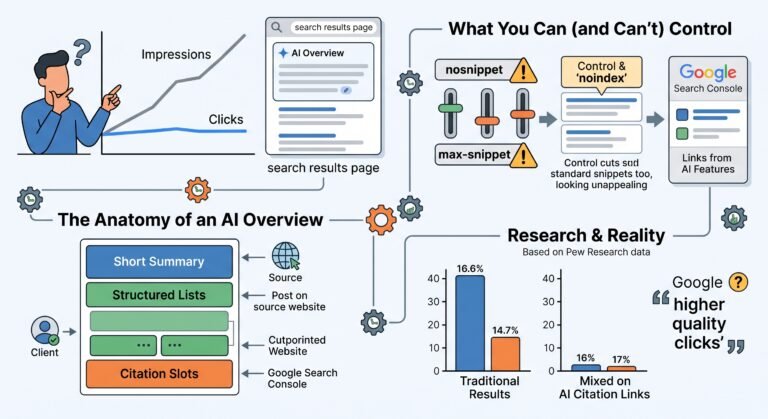
Impressions holding up or rising, while clicks fall. That’s the signature, because the page still qualifies to appear, and fewer people go on to click.
It should show up on informational and question-shaped pages first. The 2026 research on AI Overviews found that longer queries, ones beginning with question words, and ones containing both nouns and verbs were more likely to produce an overview. So a guide answering “how much does X cost” is a stronger candidate than a product page.
It shouldn’t show up evenly across the site. If every page fell at once, something else happened, most likely a core update or a technical problem.
Having that written down matters, because the failure mode here is looking at a traffic decline and attributing it to AI because AI is what everyone is talking about. I’ve seen a site blamed on AI Overviews when it had lost its canonical tags, which was both cheaper to fix and considerably more urgent.
Search Console: the gap between impressions and clicks
This is the main instrument. Google reports links shown in AI features inside your normal Search performance data, under the Web search type, with no separate AI Overviews breakdown. That’s a limitation and also what makes the impressions-to-clicks gap usable.
Work at page level, not site level. Site totals hide everything.
Open the Performance report, set a twelve month range, and compare the most recent quarter with the same quarter a year earlier. Year on year, because seasonality will otherwise dominate a quarter on quarter view. Export pages with impressions and clicks for both periods and calculate click-through rate for each.
You’re looking for pages where impressions are flat or up and CTR has fallen materially. Ten or fifteen percent relative movement is noise on small numbers. A CTR that’s halved on a page with thousands of impressions is a finding.
Then check average position on those same pages. This is the step people skip, and it’s the one that decides the whole diagnosis. If CTR fell and position also fell, you have a ranking problem wearing an AI costume. If CTR fell while position held, the results page changed shape around you, and an AI Overview is one credible explanation.
Credible, not proven. Other things change a results page: more ads, a new shopping carousel, a video pack, a competitor with better titles. I check the live result for the top queries on any page I’m suspicious about, because two minutes of looking beats an hour of inference.
GA4: the referrals you can see
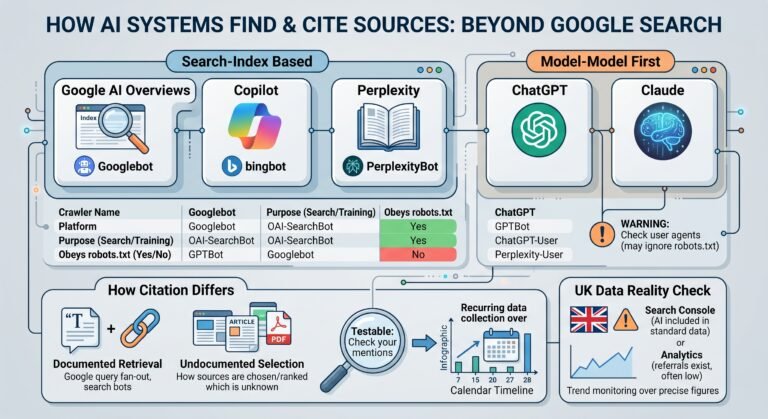
Assistants that link out can send identifiable referral traffic. ChatGPT, Perplexity and Copilot all can. In GA4 you’ll find it under Traffic acquisition, and the cleanest approach is a comparison or filter on session source containing the assistant domains.
Set this up even if the numbers are small, and set it up now, because the value is in the trend and you can’t backfill a trend you never recorded.
Two cautions on interpreting it.
A low number is weak evidence. Most assistant usage ends with the answer, so referral counts measure the minority of interactions that produced a click. A business could be well represented in assistant answers and see very little referral traffic.
A rising number is not automatically good news. It can mean more people are finding you through assistants, or it can mean assistants are increasingly the route to a page people previously reached directly.
There’s a separate post on tracking traffic from ChatGPT in GA4 that covers the setup properly.
The third source: actually asking the assistants
Neither of the tools above tells you what an assistant says about your business, and for a lot of small businesses that’s the thing that matters most.
Write out ten to fifteen questions a customer would genuinely ask before buying. Run them in ChatGPT and Perplexity. Record whether you’re named, whether the description is accurate, and which sources are cited instead of you.
Do it monthly, and keep the records. Answers vary between runs, so a single test tells you very little, and a screenshot tells you less than that. The value builds over months.
This is unglamorous manual work and I’ve not found a shortcut I trust. The tools that automate it are improving, but they mostly sample the same prompts you’d write anyway, and they can’t tell you whether the description of your business is right.
Putting a number on it, carefully
Here’s how far I’d go, and no further.
Take a page where impressions held and CTR fell while position was stable. Take its CTR from the comparison period, apply it to the current period’s impressions, and subtract the actual clicks. That difference is the clicks the page would have earned at its old rate.
That figure is an estimate of change, not a measurement of AI impact. It captures every reason the results page changed, and AI Overviews are only one of them. I’d present it to a client as exactly that, and I’d rather say “this page is earning 400 fewer clicks a month than its old click-through rate would predict” than “AI Overviews cost you 400 clicks”, because the first is defensible and the second isn’t.
If you want the commercial figure, multiply by your conversion rate and average order value or lead value. Be conservative. The traffic that stops clicking is disproportionately early-stage, so it typically converts below your site average, and treating it as average-value traffic overstates the loss.
What to do once you know
The diagnosis points at different actions depending on what you find.
If the affected pages are informational and the AI answer genuinely covers the question, accept some of that loss. A 200 word summary can answer “what is X”. You aren’t going to win that back by rewriting the page, and the honest move is to judge whether that page was ever producing enquiries or just traffic.
If the affected pages are commercial and losing clicks, that’s more serious and usually more fixable. Check the live results. Often the cause turns out to be a rewritten title, a competitor’s better snippet or a SERP feature, with no AI answer involved.
If the pages hold information an AI answer can’t compress, they’re usually worth strengthening. Specifics, local detail, pricing that depends on circumstances, genuine first-hand experience. That’s also what Google’s own guidance points at, and what the GEO research found made content more likely to be used as a source.
What I’d do
In order, and it’s mostly the first three that matter.
Check position before you conclude anything. Most suspected AI losses I look at turn out to be ranking movements, and the check takes a minute.
Look at the live results for your top ten queries by impressions. Actually look. It’s faster than any analysis and it tells you what’s on the page.
Build the page-level year on year CTR comparison in Search Console and keep it as a monthly view. It’s the only instrument that shows the pattern over time.
Set up the GA4 assistant referral segment today so you have a trend in six months.
Then start the monthly assistant testing, which is the part that takes discipline and the part nobody does.
That’s the method I use with clients, and there’s more at AI search visibility. If you want the background on how the answers get built, what AI Overviews actually are covers it.

FAQ
Can I see AI Overview impressions in Search Console?
No. Google reports links shown in AI features inside your normal Search performance data under the Web search type, with no separate AI Overviews breakdown. You can see the combined picture and infer from the gap between impressions and clicks, but you cannot isolate AI Overview impressions.
My impressions are up and clicks are down. Is that AI?
It might be, and it’s the right signature to investigate. Check average position first. If position fell alongside CTR, it’s a ranking problem. If position held while CTR fell, the results page changed shape, and an AI Overview is one credible explanation among several.
How do I track ChatGPT traffic in GA4?
Filter or segment on session source containing the assistant domains under Traffic acquisition. Set it up before you need it, because you cannot backfill the trend. Expect small numbers, and treat a low figure as weak evidence, because most assistant usage ends without a click.
Can I calculate what AI search has cost me?
You can estimate the change. Apply a page’s old click-through rate to its current impressions and subtract actual clicks. That is an estimate of total change from every cause, not a measurement of AI impact, and it should be described that way to anyone you report it to.
How often should I test what assistants say about my business?
Monthly, with the results recorded. Answers vary between runs even for identical prompts, so a single test or screenshot proves almost nothing. The value is in the pattern across several months, which is why starting the record early matters more than the first result.
Sources and method
- AI features and your website, Google Search Central, last updated 10 December 2025, accessed 24 September 2026. AI feature links being reported within normal Search Console performance data under the Web search type, with no separate breakdown.
- Investigating Click Behaviors On Google Search Result Pages That Produce an AI Overview, Chapekis, Lieb, Shah and Smith, arXiv:2608.04831, submitted 5 August 2026, accessed 24 September 2026. The finding that longer queries, question-word queries and queries containing both nouns and verbs are more likely to produce an AI Overview.
- Google users are less likely to click on links when an AI summary appears in the results, Pew Research Center, published 22 July 2025, accessed 24 September 2026. Context for the expected direction of the effect. US panel of 900 adults, March 2025 data.
- Top ways to ensure your content performs well in Google’s AI experiences on Search, Google Search Central, last updated 10 July 2026, accessed 24 September 2026. Google’s guidance on first-hand, specific content.
- GEO: Generative Engine Optimization, Aggarwal and colleagues, arXiv:2311.09735, accepted to KDD 2024, accessed 24 September 2026. The finding that adding citations, statistics and quotations improved visibility in the systems tested.
On the limits of this method. No source here supports attributing a traffic change specifically to AI Overviews, because no public data allows it. The method produces an estimate of total change on affected pages and a set of credible explanations to check. Every figure it produces should be reported that way.